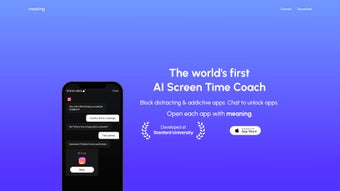

Download Meaning AI – Screen Time Management, AI Blocker, Productivity Tool
Overview
In an age where smartphones and computers dominate our daily routines, the line between productive usage and mindless scrolling has become increasingly blurred. Meaning AI steps in as a fresh, web‑based solution designed to help users regain control over their digital lives. By leveraging the Apple Screen Time API, the platform can securely block distracting applications while still allowing quick, AI‑mediated access when necessary. Its standout feature is an integrated GPT‑4 powered chatbot that evaluates the user’s request, grants a short‑term unlock, and logs the interaction for future habit‑building insights. The core philosophy behind Meaning AI isn’t to impose harsh bans but to foster a balanced relationship with technology—granting access to essential tools while gently nudging users toward more purposeful screen time.
The service is positioned as both an app blocker and an educational coach. While traditional blockers simply cut off access, Meaning AI records the context of each unlock, offering personalized feedback that can help users recognize patterns, set realistic goals, and ultimately shift from “unrestricted usage” to “meaningful engagement.” This dual approach makes it a compelling choice for students, professionals, and anyone who wants to reclaim valuable hours without sacrificing the convenience of essential apps.
Key Features that Set Meaning AI Apart
- Apple Screen Time Integration: Directly syncs with iOS/macOS Screen Time settings for reliable, system‑level blocking.
- GPT‑4 Powered Chatbot: Users can request temporary access to blocked apps; the AI evaluates the request and grants short sessions based on relevance.
- Secure, Encrypted Sessions: All communication between the web app and the device is end‑to‑end encrypted, ensuring privacy.
- Customizable Block Lists: Create categories (e.g., Social Media, Gaming, News) and assign time limits per category.
- Real‑Time Usage Analytics: Visual dashboards show daily, weekly, and monthly screen time trends, highlighting peak distraction periods.
- Educational Nudges: Periodic tips and short articles on digital wellbeing appear based on user behavior.
- Cross‑Platform Web Access: No need to install a heavyweight desktop client; the service runs in any modern browser.
- Quick Unlock Tokens: Generate one‑time tokens for short sessions (e.g., 5‑minute email check) without disabling the whole block.
- Auto‑Update & Cloud Sync: Settings are stored in the cloud, enabling seamless sync across all Apple devices logged into the same Apple ID.
- Family Sharing Mode: Parents can monitor and adjust restrictions for children while preserving privacy for adult users.
Installation & Usage: Step‑by‑Step Guide
1. Create Your Account
Visit the official Meaning AI website and click the “Sign Up” button. You’ll be prompted to enter an email address and create a strong password. A verification email is sent to confirm ownership—this step is essential for secure cloud syncing of your settings.
2. Connect to Apple Screen Time
After logging in, navigate to the “Integrations” tab. Click “Connect to Screen Time.” The web app will request permission to access your device’s Screen Time data via the Apple API. Accept the prompt on your iPhone, iPad, or Mac. Once granted, Meaning AI can read and enforce the block lists you create.
3. Configure Your Block Lists
Inside the dashboard, select “Create New Category.” Name the category (e.g., “Social Media”), add the apps you wish to block, and set a daily limit (e.g., 30 minutes). Repeat for other categories such as “Gaming” or “Streaming.” The system automatically applies these limits across all linked devices.
4. Using the GPT‑4 Chatbot for Temporary Access
When an app is blocked, you’ll see a friendly chat window prompting you to type a request (e.g., “I need to reply to an urgent Slack message”). The AI evaluates the request’s urgency, relevance, and the remaining time allowance. If approved, a temporary token is generated, unlocking the app for the specified duration (commonly 5‑15 minutes). After the timer expires, the app returns to a blocked state.
5. Review Analytics and Adjust
Weekly, the “Insights” tab provides a visual breakdown of how much time you spent in each category, how many unlocks were granted, and which moments triggered the most requests. Use this data to fine‑tune your limits or to set new goals (e.g., reduce social media usage by 10 %).
6. Maintaining Security
All data transfers are encrypted with TLS 1.3, and the chatbot never stores personal content—only metadata about the request (timestamp, app name, duration). You can delete your entire history from the “Privacy” settings at any time.
Overall, the installation process is designed to be frictionless, requiring only a few minutes to set up. Because it operates as a web app, there’s no need for bulky installers or regular patch cycles—updates happen automatically on the server side.
Compatibility, Pros & Cons
Supported Platforms: Meaning AI works on any device that can run a modern web browser and supports the Apple Screen Time API. This includes iPhone, iPad, and Mac computers running iOS 14/macOS 11 or later. Android users can still benefit from the web interface for analytics, but full blocking capabilities require an iOS device.
Pros
- Deep integration with native Apple Screen Time ensures reliable blocking.
- AI‑driven temporary unlocks reduce frustration while maintaining discipline.
- Cloud‑based settings synchronize instantly across all devices.
- Rich analytics help users understand and improve their habits.
- End‑to‑end encryption protects personal data and usage patterns.
- Family sharing mode provides parental oversight without micromanaging.
Cons
- Full functionality limited to Apple ecosystem; Android users get a reduced experience.
- Reliance on internet connectivity for AI chatbot; offline use is not possible.
- Subscription model (free trial, then $4.99/month) may deter budget‑conscious users.
- Initial setup requires granting Apple Screen Time permissions, which some users may find invasive.
Meaning AI offers a compelling blend of robust screen‑time enforcement and flexible AI‑assisted unlocks. Its seamless integration with Apple’s native controls means users won’t encounter the “ghost block” issues common with third‑party apps. The chatbot, powered by GPT‑4, adds a human‑like touch that feels less punitive and more supportive. While the reliance on an internet connection for the AI feature may be a drawback for those in low‑bandwidth environments, the overall value proposition—especially for families and professionals—justifies the modest subscription fee.
Frequently Asked Questions
Can Meaning AI block apps on Android devices?
Currently, Meaning AI’s full blocking capabilities rely on the Apple Screen Time API, which is exclusive to iOS and macOS. Android users can still access the web dashboard for analytics and can manually set restrictions using native Android Digital Wellbeing tools, but automatic blocking is not available.
Is my personal data stored or sold to third parties?
No. Meaning AI follows a strict privacy‑first policy. All communication is encrypted, and the AI only retains anonymized metadata for habit‑analysis. The company does not sell, rent, or otherwise share personal data with advertisers.
How does the temporary unlock token work?
When you request access via the chatbot, the AI evaluates the request and, if approved, generates a time‑limited token. This token is tied to the specific app and expires automatically after the allotted minutes, at which point the app reverts to its blocked state.
Can I use Meaning AI without a subscription?
A 14‑day free trial is available for new users, giving full access to all features. After the trial, a subscription of $4.99 per month is required to continue using the AI chatbot and cloud sync features. Basic blocking without AI assistance can be used in a limited “free” mode, but many advanced tools remain premium.
Is there a way to export my usage data?
Yes. Under the “Settings” → “Data Export” section, you can download a CSV file containing your daily, weekly, and monthly screen‑time statistics, along with a log of AI‑approved unlocks.
Conclusion & Call to Action
Meaning AI stands out in the crowded digital‑wellbeing market by marrying rigorous screen‑time enforcement with the flexibility of an AI‑driven assistant. Its seamless integration with Apple’s native ecosystem ensures reliability, while the GPT‑4 chatbot adds a layer of user‑friendly nuance that makes sticking to limits feel less like punishment and more like guided self‑improvement. For anyone serious about reclaiming time, reducing distraction, and building healthier habits, Meaning AI offers a balanced, secure, and insightful solution.
Ready to experience a more intentional relationship with your devices? Download Meaning AI now, start your free trial, and let the AI guide you toward a more meaningful digital life.



.png)



